FaceCheck.ID Review: Helpful for Scam Checks, But Not Identity Proof

By Smiley
Updated Jun 15, 2026_1781527674.jpg)
A suspicious profile photo can change the way you read an online conversation. It may be a dating match, a marketplace buyer, a recruiter, a crypto contact, or someone asking for trust before offering proof. FaceCheck.ID is built for that exact situation. You upload a face, it searches public web sources, and it shows where visually similar faces may appear.
The tool is useful, but it sits in a sensitive category. Face search can help users spot stolen images, fake profiles, and scam patterns. It can also mislead users if a match score is treated as confirmed identity. The real question is not whether FaceCheck.ID can find matches. The question is how much those matches should influence your judgment.
The Search Starts With Intent
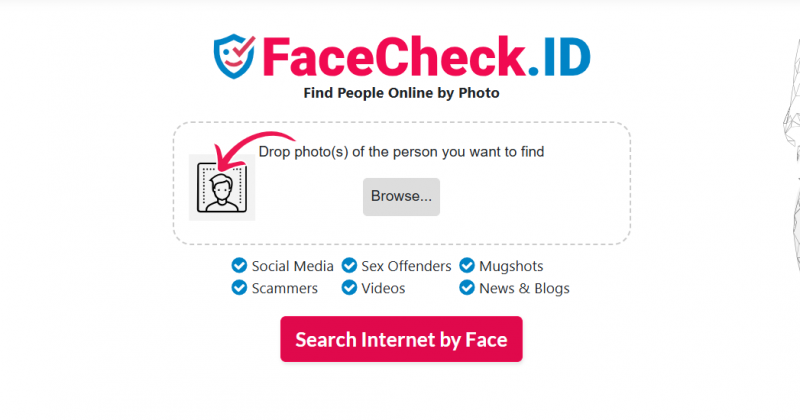
A face search should begin with a clear reason. FaceCheck.ID is strongest when the purpose is safety, verification, or self-protection. It becomes risky when it is used for curiosity, casual identification, or serious decisions about another person.
There is a clear difference between checking whether a romance-scam account is using stolen images and trying to identify a private individual without a valid reason. One is defensive. The other can cross into invasive territory.
| Search reason | Better approach |
| “This dating profile may be fake.” | Reasonable if results are treated as clues |
| “Someone may be using my photo.” | Reasonable for self-protection |
| “This person is asking me for money.” | Useful as part of a wider scam check |
| “I want to identify this stranger.” | Risky and ethically weak |
| “I want to screen a worker, tenant, or customer.” | Not an appropriate use case |
FaceCheck.ID is not a general background-check tool. It should not be used for employment, housing, credit, insurance, or any formal decision about someone’s life. Its proper role is much narrower: helping users investigate whether an image has appeared elsewhere in a suspicious or inconsistent context.
What FaceCheck.ID Actually Shows
FaceCheck.ID is a reverse face search engine. You upload a photo, and the platform looks for matching or visually similar faces across public web pages. Results may include thumbnails, source links, similarity scores, and warning labels connected with risky categories.
The key word is similar.
FaceCheck.ID does not confirm who a person is. It shows where a face, or a similar-looking face, may have appeared online. That makes the tool useful for investigation, but weak as final evidence.
It can help answer practical questions such as:
- Has this profile photo appeared somewhere else?
- Is the same face being used under different names?
- Is the image connected to scam reports or suspicious pages?
- Does the photo look copied from another source?
- Are there public traces of my own face online?
It cannot reliably prove that a person is guilty, real, fake, dangerous, or trustworthy. A result is a lead. It is not a conclusion.
Reading the Result Page
A FaceCheck.ID result usually has three parts: the match score, the source page, and sometimes a red-flag label. Each part needs to be read separately.
The match score shows how visually close the result appears. FaceCheck.ID uses a 0 to 100 scale. Scores from 90 to 100 are the strongest matches. Scores from 83 to 89 are still treated as confident. Scores from 70 to 82 are more uncertain, while anything below that needs extra caution.
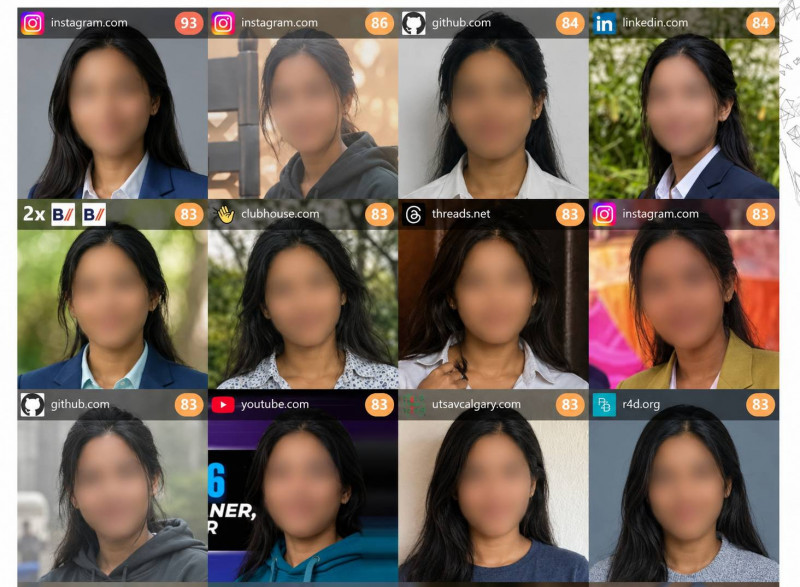
A strong score may mean the same image has been reused. It may also mean the face is visually close. That is why the score should never be read without the source page.
The source page carries the real context. If a result points to a social profile, scam-report page, public forum, video page, adult listing, or news item, the next step is to open it and check what is actually there. Look at the page date, name, caption, profile history, image placement, and whether the page still contains the same photo.
The red-flag label is useful, but it needs the most caution. It may point to a risky image trail, not necessarily a risky person.
The Red-Flag Problem
FaceCheck.ID may show red flags when a match is connected with areas such as scam reports, adult content, mugshot-style pages, multiple identities, or other suspicious contexts. For a user checking a profile that feels wrong, this can be valuable. If the same face appears under several names or in scam discussions, that is a reason to pause.
But a red flag is not a moral judgment on the person in the image.
Scammers often steal photos from models, creators, professionals, soldiers, doctors, influencers, and ordinary social media users. The person whose face appears in a suspicious result may have nothing to do with the suspicious activity. The photo may be the thing being misused.
The safest reading is this: the image trail may be risky, but the person in the photo is not automatically responsible.
That distinction is essential. FaceCheck.ID can help protect users from fake profiles, but it can also create unfair suspicion if results are read carelessly.
A Better Way to Use FaceCheck.ID
FaceCheck.ID works best when used as part of a small verification process, not as a one-click answer.
Start with photo quality. A clear, front-facing image with good lighting gives the tool its best chance. Blurry screenshots, cropped dating-app images, side angles, heavy filters, sunglasses, hats, and masks can weaken results.
Then read the score band. A 90-plus result is worth checking closely, but it is not proof. An 83 to 89 result can be a strong lead if the source context supports it. Lower scores should be treated carefully unless several other signals point in the same direction.
The source page should always be checked before judgment. A thumbnail preview can mislead. A profile may be old. A page may have changed. A photo may have been copied from somewhere else.
A safer workflow looks like this:
- Use the clearest image available.
- Prioritize high-score matches.
- Open the source page before making assumptions.
- Compare names, dates, captions, and profile activity.
- Look for repeated image use across different sources.
- Treat one result as a clue, not proof.
- Separate stolen-photo misuse from personal guilt.
This process makes the tool more reliable because it forces the user to verify context before reacting.
Accuracy Depends on the Case
FaceCheck.ID can be useful when the same image has already been reused publicly. That is the classic scam-check scenario. A fake profile copies a photo, and the tool finds the older source or other reused versions.
It becomes less reliable when users expect it to confirm a person from one poor image. A low-quality screenshot, edited selfie, side-angle photo, AI-generated face, or heavily filtered image can lead to weak matches. It can also miss images that sit behind login walls, have been deleted, are blocked from indexing, or are not included in its search coverage.
| Situation | Expected reliability |
| Exact same profile photo reused online | Strongest case |
| Clear public face image | Often useful |
| Different photo of the same person | Possible, but less certain |
| Blurry chat screenshot | Higher risk of poor matches |
| Filtered or AI-edited image | Results can become unreliable |
| Similar-looking stranger online | False positives are possible |
The accuracy verdict is straightforward: FaceCheck.ID can be strong at finding repeated image use, but it should not be expected to confirm identity from one imperfect photo.
Pricing and Credits
FaceCheck.ID does not use a simple monthly subscription. It runs on a credit system, where one search costs 3 credits. That means the real value of each package depends on how many searches you can run before the credits expire.
| Plan | Price | Credits | Approx. searches | Credit expiry |
| Just a Peek | $6 | 36 | 12 searches | 2 days |
| Rookie Sleuth | $19 | 150 | 50 searches | 14 days |
| Private Eye | $47 | 400 | 133 searches | 2 months |
| Deep Investigator | $197 | 2,000 | 666 searches | 6 months |
| The Professional | $597 | 10,000 | 3,333 searches | 1 year |
The pricing issue is not only the cost per search. It is the buying experience. FaceCheck.ID is mainly built around crypto-based payments, and that immediately makes it less casual-user friendly. Someone who only wants to check one suspicious dating profile may not want to buy crypto, manage credits, or deal with a short expiry window.
For occasional users, the smaller plans can feel restrictive because the credits expire quickly. For regular users, the higher plans reduce the per-search cost, but they only make sense if you genuinely expect to run many searches. The larger packages are better suited to OSINT researchers, journalists, scam investigators, or users who repeatedly check suspicious profiles.
My read is simple: FaceCheck.ID is priced like a specialized search tool, not a casual safety app. If you only need one quick check, start with free reverse image tools first. If those tools do not answer the question and the situation feels serious enough, then paying for FaceCheck.ID becomes easier to justify.
Privacy Is the Hardest Question
FaceCheck.ID says uploaded search images are not added to its database, search history is deleted after 24 hours, and IP addresses are not logged. It also offers a removal process for people who want their own images removed from results.
Those privacy claims matter, but they do not remove the larger concern. A face is not just another image. It is a biometric identifier. Searching by face can connect a person’s public appearances across contexts they may not expect to be connected.
That is why FaceCheck.ID should be used with restraint. Scam victims, dating-app users, journalists, and people checking their own image exposure may have valid reasons to run a search. But the same technology can be misused for stalking, harassment, doxxing, or suspicion-building.
The safest rule is simple: do not upload a face unless there is a legitimate safety, verification, or self-protection reason.
The Removal Option
FaceCheck.ID allows people to request removal of their own face from search results. The process generally involves finding the image, selecting the results, and confirming identity through selfie verification or an anonymized ID document.
This is an important feature because a face-search service should not only provide search power. It should also provide a way to reduce unwanted exposure.
There is one limit users should understand. Removing a result from FaceCheck.ID does not delete the original photo from the website where it appeared. If the image exists on a third-party site, that source must be contacted separately.
What Users Like and Dislike
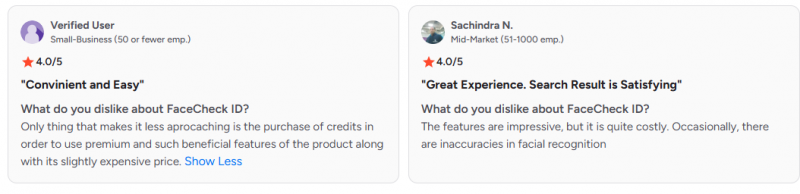
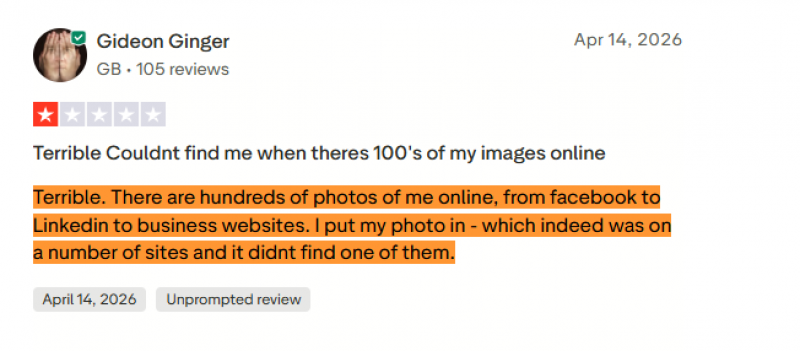
Public feedback around FaceCheck.ID is mixed, but the pattern is clear. Users who like it usually praise the quick upload process and the ability to uncover reused photos. It is especially valued in scam and catfish checks where the same face appears under different names.
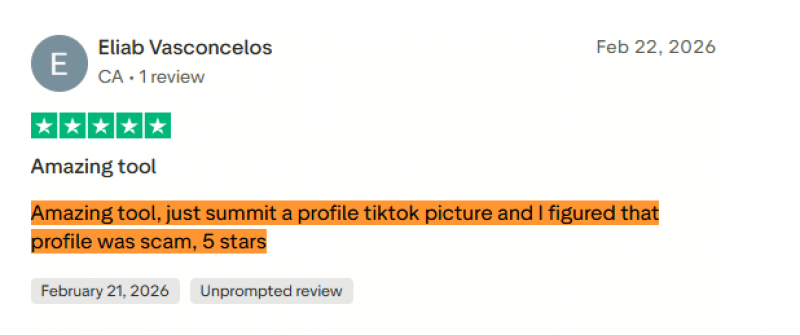
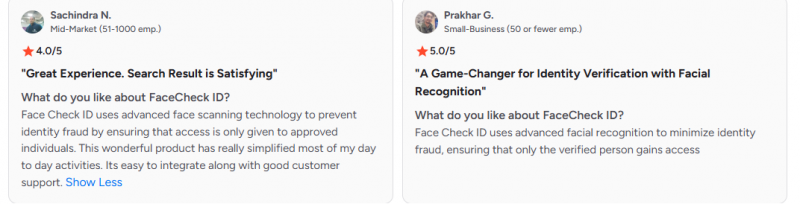
Complaints focus on cost, crypto payment, credit expiry, false positives, missed results, and stale source links. Some users say the tool returns lookalikes instead of the person they expected. Others dislike paying before they feel confident in the quality of the results.
| Users like | Users complain about |
| Fast face-upload workflow | Crypto payment is inconvenient |
| Useful for scam and catfish checks | Credits and expiry feel restrictive |
| Match scores help sort results | Similar-looking people can appear |
| Source links support verification | Some public images are missed |
| Red flags warn users quickly | Results can be overinterpreted |
The fairest reading is this: FaceCheck.ID feels impressive when it finds the right image trail, but frustrating when it returns almost-matches or adds payment friction before the user feels certain.
Safer Alternatives First
FaceCheck.ID should not always be the first stop. If the goal is only to check whether a photo has been copied, normal reverse image search may be enough.
| Alternative | Best for | Why it is useful |
| TinEye | Finding copied or reused images | Best first step for checking whether a photo appears elsewhere online. |
| Google Lens | Quick free image checks | Useful for finding similar images, websites, posts, and public pages. |
| Bing Visual Search | Free visual search backup | A simple second option when Google Lens does not show enough context. |
| Copyseeker | Finding image sources | Helpful for tracing duplicate images and checking where a photo may have come from. |
| Bitdefender Scamio | Checking scam messages and links | Better when the risk is the conversation, payment request, or suspicious link. |
| PimEyes | Face-focused search | A close alternative to FaceCheck.ID, but it has similar privacy and false-match concerns. |
Who Should Use It
FaceCheck.ID is a good fit for users who understand uncertainty. It can help dating-app users, scam victims, journalists, OSINT researchers, creators checking impersonation, and individuals checking where their own face appears online.
It is not a good fit for people who want instant certainty. It is not for employers, landlords, insurers, lenders, or anyone making formal judgments about another person. It is also not ideal for users who dislike crypto payments, credit systems, or tools that process face images.
The best user is not the most suspicious one. The best user is the most careful one.
Pros and Cons
| Pros | Cons |
| Useful for finding reused faces and suspicious profile photos | Cannot prove identity |
| Match scores make results easier to sort | Scores can create false confidence |
| Red flags can surface risky image contexts | Stolen photos can implicate innocent people |
| Source links support manual verification | Some links require credits |
| Removal option is available | Removal does not delete the original source page |
| Helpful for scam and catfish checks | False positives and missed results remain possible |
| Stronger than normal image search for faces | Raises privacy and consent concerns |
Final Verdict
FaceCheck.ID is valuable when used with restraint. Its best role is not to identify people. Its best role is to interrupt blind trust.
If someone online is using a stolen image, repeating the same face under different names, or appearing in suspicious public contexts, FaceCheck.ID can help reveal that pattern faster than manual search. That makes it useful for scam checks, catfish detection, impersonation concerns, and personal image monitoring.
But the tool becomes risky when users treat a match as proof. A score is not identity. A red flag is not guilt. A source link is not always current. A suspicious image trail may point to stolen-photo misuse rather than the real person in the picture.
The pricing also narrows its appeal. The credit system, crypto payment, expiry windows, and final-sale terms make it better suited to serious users than casual one-time searchers.
My recommendation is clear: use normal reverse image search first. Use FaceCheck.ID only when the situation matters, the face is central to the risk, and you are ready to verify every result manually. It is a strong tool for finding clues. It is a weak tool for making final judgments. FaceCheck.ID can show where a face may have traveled online. It cannot tell you the whole truth about the person behind it.